Install UO
Install Game Files
Download Game Files
What is DoTSetup.exe? DoTSetup.exe is a windows installer that installs all the old school game files needed to play DoT:A (260 MB download)
Edit login.cfg
-right click on login.cfg - OPEN WITH NOTEPAD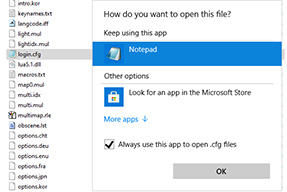
-change to
LoginServer=71.86.189.184,7774
-SAVE
NOW DCLICK CLIENT.EXE or DESKTOP SHORTCUT TO PLAY!!!
Install Game Files
- double click the file and follow the instructions to install Ultima Online Renaissance to your computer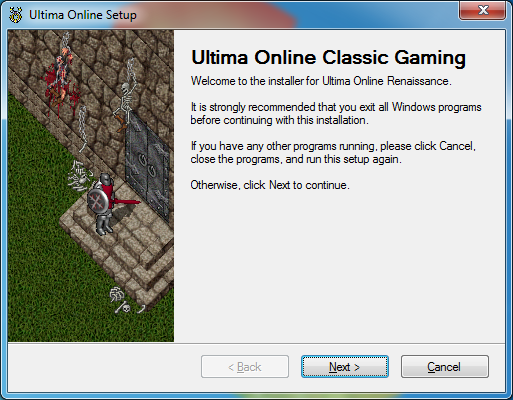
I recommend installing to C:/GAMES/
so UO will be installed at C:/GAMES/Ultima Online
Install Orion
Install Optional Orion Client
Download Orion Launcher
Click the button below, or Go to Orion webpage
http://orionuo.online
Select your version and install the ORION LAUNCHER
I recommend installing to C:/GAMES/Orion
You want Orion Launcher, and Orion Client all in the same folder!
Create Profile
- now click on profile, go to edit profile
change the name and ip address,
also unclick encrypt password
Dragons of Time
71.86.189.184,7774
Orion Client Setup
STEP 1 - run ORION LAUNCHER, select where the your ULTIMA ONLINE installation is.
Remember, I recommended C:/GAMES/Ultima Online
STEP 2
- now select where youd like ORION CLIENT installed, i suggest putting ORION CLIENT in the same folder as the LAUNCHER.
I recommend C:/GAMES/Orion
STEP 3
- now orion should automatically update and download the required files.
Click apply updates to download the Orion Client files
Select Client
- click on Configure client version then FROM CLIENT.EXE FILE
now navigate to the Ultima Online folder and select the client.exe
Click create and ok
Now just click "Launch" to launch the ORION CLIENT!
New to Ultima Online?
New to Dragons of Time?